Tiptap 에디터
공동 편집 기능이 들어간 에디터를 개발했습니다. (25.03.24 ~)
언제까지 유효할진 모르겠지만, 공동편집 체험하기에 가볍게 띄워놨습니다.
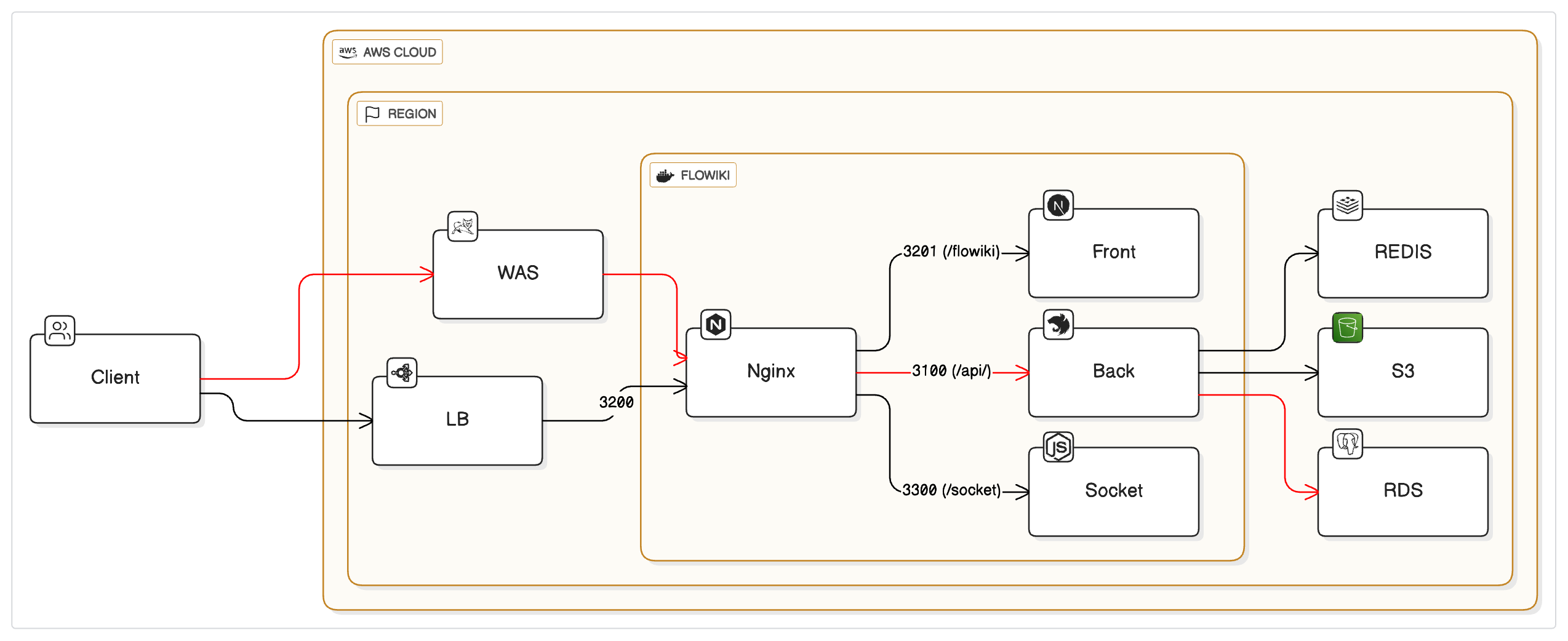
Tiptap에서 제공하는 익스텐션 기능들을 기반으로 만들었으며, 초기 구현 이후 Hocuspocus + Yjs 기반 아키텍처로 고도화하여 더 안정적인 실시간 공동편집을 구현했습니다.
맡은 역할
사용할 라이브러리를 정하는 것과 에디터, 공동편집 그리고 레디스를 통한 캐싱 DB 이후 Postgres로 저장하는 부분에 대한 연구, Nest Server 기본 구조에 대해 1차적으로 진행하게되었습니다.
에디터
일단 Tiptap, Milkdown, Lexical, etherpad를 고려하였는데,
| 항목 | Tiptap | Milkdown | Lexical | Etherpad |
|---|---|---|---|---|
| 기반 엔진 | ProseMirror | ProseMirror | Custom (Meta) | 자체 구현 |
| 마크다운 지원 | ❌ 기본 지원 없음 (직접 구현 필요 / 플러그인 필요) | ✅ 기본적으로 마크다운 기반 | ❌ 기본은 마크다운 아님 (직접 처리해야 함) | ❌ 플러그인 설치 필요 |
| 협업 편집 지원 | ✅ Yjs 통합 쉬움 | ✅ Yjs 지원 (ProseMirror 기반) | ❌ 직접 구현 필요 (Yjs 일부 예시 존재) | ✅ 기본 실시간 협업 지원 |
| 확장성 | ✅ 매우 높음 (Extension 중심 구조) | ⚪ 중간 (플러그인 구조 있음) | ✅ 매우 높음 (플러그인 시스템 설계됨) | ⚪ 제한적 (기본 플러그인 구조 존재) |
| UI 커스터마이징 | ✅ 자유롭고 유연 | ✅ 테마, 스타일 커스터마이징 용이 | ✅ 자유도 매우 높음 (Barebone) | ⚪ 제한적 |
| 레퍼런스/커뮤니티 | ✅ 매우 많음 (Notion, Craft 등도 사용) | ⚪ 상대적으로 적음 | ⚪ 성장 중 (Meta 지원) | ⚪ 오래되었지만 최신 커뮤니티는 적음 |
| 도입 난이도 | ⚪ 중간 (구조 이해 필요) | ✅ 쉬운 편 (마크다운 특화 구조) | ⚪ 높음 (직접 많은 것 구현 필요) | ✅ 쉬운 편 |
| 문서화 | ✅ 잘 되어 있음 | ⚪ 비교적 부족한 편 | ✅ 공식 문서 명확 | ⚪ 오래된 문서가 많음 |
| 특징 요약 | 모던하고 확장성 높으며 협업도 가능한 실전형 에디터 | 마크다운 특화, 빠른 도입에 적합 | React 기반으로 자유도 높지만 구현 부담 있음 | 실시간 협업에 강하지만 UI/UX 제한 |
Tiptap은 익스텐션을 통한 확장이 자유롭고 완성도가 높은 점, 많이 사용하고 있기 때문에 레퍼런스가 많은 점, 이후의 확장성, 제품의 방향성이 Tiptap이 가장 적합하다고 생각되어 고르게 되었습니다.
공동편집 - Hocuspocus + Yjs 아키텍처
초기에는 Tiptap의 extension-collaboration만 사용했지만, 안정적인 실시간 동기화를 위해 Hocuspocus 서버를 도입했습니다.
현재 아키텍처
flowchart LR
    Client["Client<br/>(Tiptap)"] <-->|"WebSocket<br/>(Yjs sync)"| Hocuspocus["Hocuspocus<br/>Server"]
    Hocuspocus -->|"HTTP API<br/>(초기 로드)"| NestJS["NestJS<br/>Backend"]
    Hocuspocus -.->|"Y.Doc 관리"| YDoc[(Y.Doc)]
    NestJS -->|"캐싱/저장"| Storage[(Redis + Postgres)]
Hocuspocus 서버 구현
// flowiki-socket/index.js
import { Server } from '@hocuspocus/server'

// NestJS API에서 문서 조회
async function fetchDocumentFromAPI(docId) {
  const apiUrl = process.env.NESTJS_API_URL || 'http://127.0.0.1:3002'
  const response = await fetch(`${apiUrl}/documents/${docId}/content`, {
    headers: { 'x-internal-service': 'hocuspocus' },
  })
  return await response.json()
}

const server = Server.configure({
  port: parseInt(process.env.HOCUSPOCUS_PORT || '1234'),

  // 문서가 메모리에 없을 때 최초 1회 실행
  async onLoadDocument(data) {
    const { documentName, document: ydoc } = data
    const docId = documentName.replace(/^doc-?/, '')

    // API에서 콘텐츠 조회
    const apiData = await fetchDocumentFromAPI(docId)

    if (apiData?.contentStr) {
      // Y.Map에 초기 콘텐츠 JSON 저장
      const initialContentMap = ydoc.getMap('initialContent')
      initialContentMap.set('json', apiData.contentStr)
      initialContentMap.set('loaded', false) // 클라이언트가 처리 후 true로 변경
    }

    return ydoc
  },
})

server.listen()
핵심 포인트:
onLoadDocument: 문서가 처음 요청될 때 NestJS API에서 콘텐츠를 가져와 Y.Doc에 저장x-internal-service헤더로 내부 서비스 호출 인증- Y.Map을 통해 클라이언트에 초기 콘텐츠 전달
NestJS 내부 API (Hocuspocus 전용)
// documents.controller.ts
@Get(':docId/content')
async getDocumentContent(@Param('docId') docId: string, @Req() req: Request) {
    // 내부 서비스 호출 확인
    const internalService = req.headers['x-internal-service'];
    if (internalService !== 'hocuspocus') {
        throw new NotFoundException('Not found');
    }
    return this.documentsService.getDocumentContentForHocuspocus(docId);
}
데이터 저장 전략
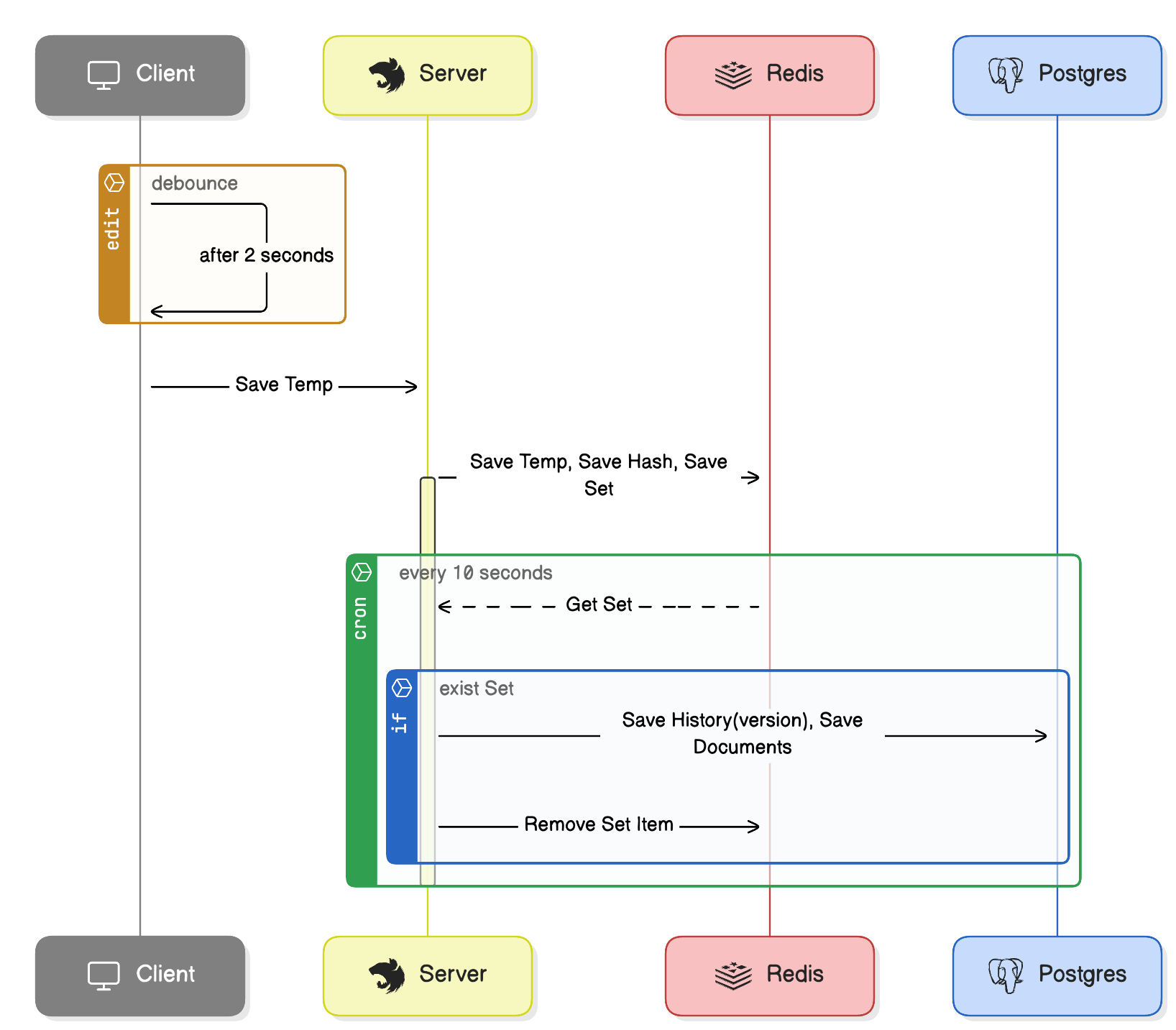
에디터의 내용이 수정되면 2초의 debounce를 거쳐 NestJS로 저장 요청을 보냅니다.
// Editor.jsx - 클라이언트 저장 로직
const sendUpdate = useCallback((editor) => {
    fetch('/documents/temp', {
        method: 'POST',
        headers: { 'Content-Type': 'application/json' },
        body: JSON.stringify({
            docId: room,
            contentStr: JSON.stringify(editor.getJSON()),
        }),
    });
}, [room]);

const debouncedSendUpdate = useCallback(debounce(sendUpdate, 2000), [sendUpdate]);

const editor = useEditor({
    onUpdate: ({ editor }) => {
        debouncedSendUpdate(editor);
    },
})

// 창 닫기 전 강제 저장 - 데이터 유실 방지
useEffect(() => {
    const handleBeforeUnload = () => debouncedSendUpdate.flush();
    window.addEventListener('beforeunload', handleBeforeUnload);
    return () => window.removeEventListener('beforeunload', handleBeforeUnload);
}, [debouncedSendUpdate]);
수정사항이 있을 경우 Nest에서 saveTemp로 받아 redis에 저장해두고, caching으로 사용 및 중간 단계로 저장하며 일정 시간이 지난 후 postgres에 history를 insert, 수정된 내용으로 upsert를 진행합니다.
//Nest 소스
@Injectable()
export class Service {
    constructor(
        @Inject('REDIS') private readonly redisClient: Redis,
        @Inject('PG_POOL') private readonly pool: Pool,
    ) {}

    //조회 로직
    async getDocument(docId: string, userId: string) {
        const key = `doc:${docId}:temp`;
        let contentStr = await this.redisClient.get(key);
        if (contentStr) {
            return contentStr;
        }
        //캐싱된 문서가 없을 경우 cache stampede 발생을 방지하기 위해 lock 설정
        const lockKey = `lock:${docId}`;
        // 락을 10초 동안 설정 (NX: key가 존재하지 않을 때만, EX: 만료 시간 설정)
        const lock = await this.redisClient.set(lockKey, 'locked', 'EX', 10, 'NX');
        if (lock) {
            try {
                // 락을 획득했으므로, 다시 캐시를 확인 (다른 프로세스가 캐시를 채웠을 수 있음)
                contentStr = await this.redisClient.get(key);
                if (contentStr) {
                    return contentStr;
                }
                const client = await this.pool.connect();
                try {
                    //postgres에서 문서를 조회해와서 레디스에 캐싱
                    const result = await client.query(`select content_json from documents where doc_id = $1`, [docId]);
                    contentStr = result.rows[0]?.content_json;
                    if (contentStr) {
                        await this.redisClient.set(key, contentStr, 'EX', 3600);
                    }
                    return contentStr;
                } finally {
                    client.release();
                }
            } finally {
                // 락 해제
                await this.redisClient.del(lockKey);
            }
        } else {
            // 락을 획득하지 못한 경우 잠시 대기 후 재시도
            const baseDelay = 100; // 100ms
            const maxDelay = 10000; // 최대 10초
            const backoffTime = Math.min(baseDelay * Math.pow(2, retryCount), maxDelay) + Math.floor(Math.random() * 100);
            await new Promise(resolve => setTimeout(resolve, backoffTime));
            return this.getDocument(docId, userId, retryCount + 1);
        }
    }

    //문서 저장 시 redis에 캐싱하는 부분
    async saveTemp(docId: string, content: any) {
        const contentStr = JSON.stringify(content);
        const currentHash = crypto.createHash('sha256').update(contentStr).digest('hex');
        const lastSavedHash = await this.redisClient.get(`doc:${docId}:lastSavedHash`);
        if (lastSavedHash === currentHash) {
            return { success: false, message: '중복된 요청입니다.' };
        }
        // 임시 저장: Redis에 JSON 문자열로 저장
        await this.redisClient.set(`doc:${docId}:temp`, contentStr, 'EX', 3600);
        await this.redisClient.set(`doc:${docId}:lastSavedHash`, currentHash, 'EX', 3600);
        await this.redisClient.sadd('modifiedDocs', docId);
        return { success: true };
    }

    //cron을 통해 postgres에 저장하는 부분
    async saveFinal(docId: string) {
        const contentStr = await this.redisClient.get(`doc:${docId}:temp`);
        if (!contentStr) {
            throw new Error('해당 문서의 임시 데이터가 없습니다.');
        }

        // 변경사항이 있을 경우, Postgres에 upsert 실행
        const client = await this.pool.connect();
        try {
            await client.query(
                `
                    INSERT INTO documents_history (doc_id, content_json, created_at, user_id)
                    VALUES ($1, $2, now(), 'test_user')
                `,
                [docId, contentStr],
            );
            await client.query(
                `
        INSERT INTO documents (doc_id, content_json, updated_at)
        VALUES ($1, $2, now())
        ON CONFLICT (doc_id)
        DO UPDATE SET content_json = EXCLUDED.content_json, updated_at = now()
        `,
                [docId, contentStr],
            );
            await this.redisClient.srem('modifiedDocs', docId);
            return { success: true };
        } catch (error) {
            throw error;
        } finally {
            client.release();
        }
    }

    // 주기적인 작업: 변경사항이 있을 때만 saveFinal 실행
    @Cron('*/10 * * * * *') // 10초마다 실행 (조건에 따라 조정 가능)
    async periodicSave() {
        const docIdsSnapshot = await this.redisClient.smembers('modifiedDocs');
        if (docIdsSnapshot.length === 0) {
            return;
        }

        from(docIdsSnapshot)
            .pipe(
                mergeMap((docId) =>
                    from(this.saveFinal(docId)).pipe(
                        catchError((error) => {
                            console.error(`문서 ${docId} 저장 중 에러 발생:`, error);
                            // 에러가 있어도 흐름을 이어가기 위해 null 반환
                            return of(null);
                        }),
                    ),
                ),
            )
            .subscribe();
    }
}
고려점
- client side기 때문에 같은 요청이 여러 번 올 수 있는 것을 고려하여 lastSavedHash에 해시 값을 저장해두고 비교하여 동일 내역일 경우 히스토리에 쌓지 않도록 처리하였습니다.
- cache stampede를 고려하여 처음 들어오는 요청에 lock을 걸고 조회하여 캐싱 처리하였습니다.
- lock이 이미 걸려있을 경우, back off 전략을 적용하였습니다.
- redis에 변경사항을 저장해두고, redis의 set에 변경된 문서 리스트를 넣고 조회하여 변경된 문서들만 upsert 처리하였습니다.
- Rxjs를 사용하여 병렬 처리로 히스토리를 저장하게 만들었습니다.
- front에선 debounce를 사용하여 너무 자주 저장하지 않도록 처리했습니다. 또한, 문서 수정 후 바로 창을 종료할 경우에도 대비하였습니다.
이후 추가적으로 고려할 점
- 문서 길이에 대한 정책이 정해지고, 굉장히 긴 문서를 저장해야 할 경우 history의 개수에 대한 고려
- git-like 증분 히스토리 방식 고려. 히스토리를 많이 유지할 경우, 각 스텝을 되돌아가야한다는 점과 git-like 방식의 복잡성에 대한 문제가 있지만, 문서 길이가 길어질 경우 다 저장하는 것이 비효율적이기 때문에 고려해야함.
댓글 (0)